
YYou know how confusing it can be when your decorating style starts to evolve, and you’re trying to blend things you’ve collected over time with newer pieces?
If you prefer to decorate gradually or keep and reuse items you already own, you’ve probably experienced this same mix of excitement and uncertainty—especially if you love lots of different styles and tend to follow creative whims.
Lately I’ve been in that place, moving through the house and decorating room by room. I keep asking myself what should stay, what should go, what works together and what doesn’t, and what I might still need to add.
And I keep wondering exactly where my style is heading—if that’s even the destination I want.
Lots of wondering.
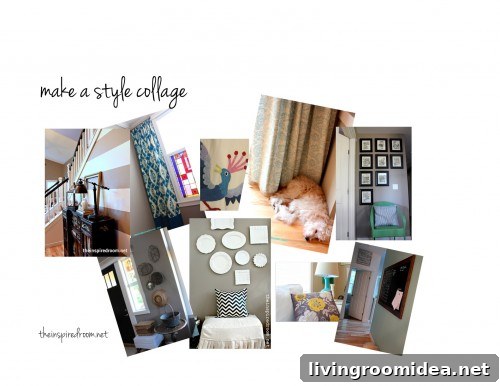
Then I had an idea that helped clarify things: what if I made a virtual style collage? Not an inspiration board to plan something new, but a visual progress report showing where I already am.
I created an inspiration board for my office using Polyvore because I wanted to see how new and existing pieces might work together. For my progress-collage, though, I used photos of spaces I’ve already finished to check whether the overall look is heading in the right direction or needs adjustment.
So I made a “Progress Report” Style Collage. (There might be a better name, but that’s what stuck for now.)
To begin, I reviewed photos of rooms and corners I’m happy with and pulled the strongest images together. I arranged them in Pages on my Mac so I could see everything side by side. Seeing my real rooms together helped me identify which elements feel cohesive, which feel out of place, and what’s missing.
The collage didn’t solve all my design questions, but it made the choices clearer and more fun. I plan to add new photos as ideas come—pillow options, fabric swatches, or furniture pieces I’m considering—to help guide future updates and create a consistent house-wide vibe.
If you don’t have photos of your own rooms, you can still create a style collage using tools like Polyvore. Search their site for furniture and accessories similar to what you already own and assemble them into a board that represents your current look.
How to Make Online Inspiration Boards and Collages
Here are a few easy ways to build stylish online collages using your photos or sourced images:
Use Pixlr to combine and edit images, or try Picasa for simple photo collage layouts. Both let you arrange images, crop, and adjust size so you can study how pieces relate to one another.
The collage I made is much larger on my screen; it’s easier to evaluate when you can view it at a comfortable size, so don’t be afraid to zoom in as you edit.
I hope you make your own style collage—consider it a visual progress report. You could even organize a link-up so we can share and compare boards. Would you be interested?
Do you know of other simple tools or methods for making virtual collages?
Quick reminder: Friday is the last day to vote for blog nominations in The Homies before finalists are chosen. Thank you for your support—it means a lot to me and many fellow bloggers I admire.