
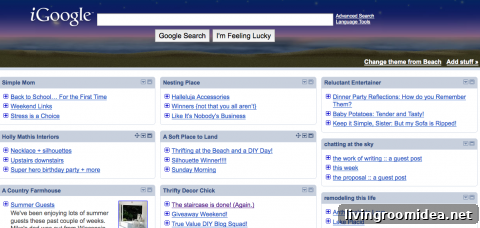
I haven’t shared blogging tips in a while, but here’s a quick, practical one I use daily.
It may not be new to everyone, but it has been a lifesaver for me. Everyone develops their own system for keeping up with favorite blogs—this is mine. A reader mentioned recently that they had “lost” me for a while, and this method helps make sure you don’t lose track of the blogs you enjoy.
Do you use an iGoogle home page?
If you don’t, I recommend setting one up. The setup is straightforward and makes following blogs much simpler. I keep most of my favorite blogs right on my iGoogle home page, shown in the image above.
Using the iGoogle home page makes daily blog reading easy. My Google Reader used to be overwhelming—thousands of unread posts that caused anxiety—so my home page approach felt like a relief. While I still use Google Reader, the customized home page has become my go-to for staying up to date without feeling stressed by the sheer volume of posts.
On the home page I can see the blogs I read most often. When they publish new content, I notice it immediately. If you don’t see your blog in the screenshot above, it’s probably further down my page—I promise! The home page shows only the most recent posts from each blog, so if I fall behind I don’t feel guilty. I can click through to read and comment on the original blog or open the post in the reader.
In addition to the blogs on my home page, I discover posts in many ways: comments left on my posts (I love those links—thank you!), Twitter, and Facebook. The iGoogle page just stores the main blogs I want to check daily.
Give it a try!
After setting up your iGoogle home page, start adding blogs you want to follow regularly. When you click an RSS subscribe button or a feed link on a blog, you’ll often see a page that looks like the image below. Choose the Google option.
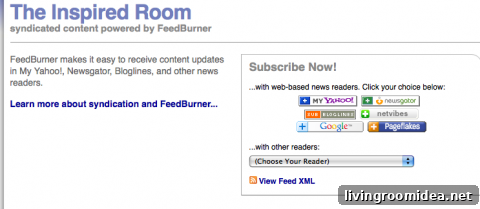
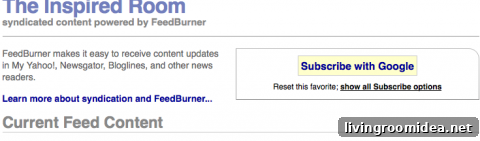
Click the Google choice, and you’ll be taken to a screen that lets you subscribe with your Google account. Select “Subscribe with Google.”
Next you should see a confirmation screen. From there, choose “Add to Google home page.” The blog will then appear on your home page, making it easy and convenient to read new posts as they appear.
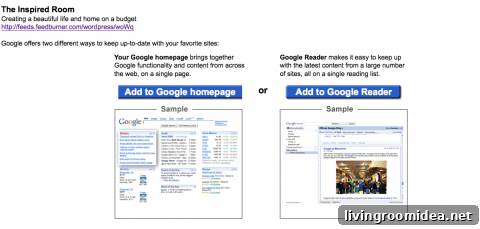
Play around with the setup and see if reading blogs this way works for you. I find it reduces the overwhelm and helps me stay connected to the blogs I love.
How do you read blogs?
This post was shared with Works for Me Wednesday at We are THAT Family.
If you’re a blogger, you might be interested in an e-book by ProBlogger about improving your blog in 31 days. It’s an inspiring guide that many bloggers find helpful. The author offers this as a paid product, and the recommendation here reflects my positive experience with the resource.